|
Sends absolute ANONYMOUS bulk emails. You won't lose your ISP service. It is trouble free! Your IP address will never be shown in the email headers.
Manual and screenshot
 After installing 123 Hidden Sender, you can open the full help document by clicking [Menu->Help->Content]. After installing 123 Hidden Sender, you can open the full help document by clicking [Menu->Help->Content].
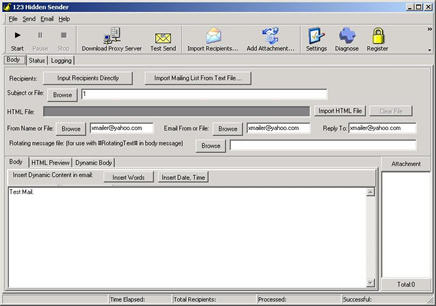
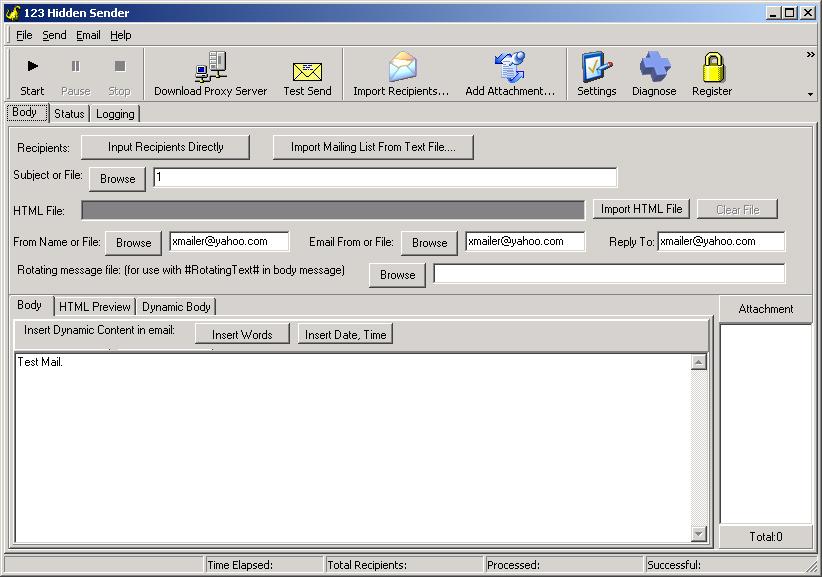
Here is a simple example about how to use 123 Hidden Sender to send bulk email. Just follow me please. It is very easy. Below is a screenshot of 123 Hidden Sender's main interface.
1.
Start 123 Hidden Sender.
You can start 123 Hidden Sender by clicking on the corresponding icon on the Start Menu.
2.
Import Recipients.
As the image over show, click the button of [Import Recipients.]. Then select a text file where you store your mailing list. After you click the [OK] button of the Open File Dialog window, all the recipients will be imported into the system.
3.
Compose email to be sent.
Before you start to send bulk email, you should compose the email to be sent first. All of the items include subject, body, sender email and reply email can not to be empty.
4. Settings
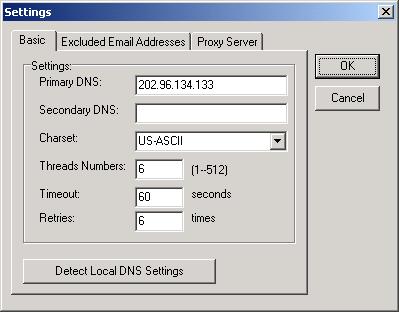
Primary DNS Server : The primary DNS Server 123 Hidden Sender use to query the MX server of the destination domain. (Required)
Secondary DNS Server: When the primary DNS server does not work properly, 123 Hidden Sender will try to get the MX server of a domain from secondary DNS Server.
Charset Encoding : Selection the charset type of your language.
Threads Numbers : The maximum thread number of sending email simultaneously. The parameter is decided by your Internet connect speed and your computer ability. Suggestion: 1) More threads maybe need more timeout 2) Reasonable max thread mean faster sending speed.
Connection Timeout(s) : The max timeout of sending any email. Its unit is second. Noted : 1) Fast Internet connect speed can set litter timeout; 2) Often you can set this parameters between 60~180 seconds; 3) More timeout mean slow sending speed; 4) Smaller timeout may cause more failed sending status.
Retry Send Times : Tell the system how many times it should retry if failure occurs.
Q: How to get high send out success rate?
A: Set more "Retries", then program will try more times to send out email. This will make the total send speed slower while get the high success rate.
5.
Start to send bulk email.
Click the button [Start] to send email. You can click the [Stop] button to stop the send process whenever you want to stop sending.
6.
Send personal email.
123 Hidden Sender can send personal email by CSV file import and Randomization Tags and Personalizing Tags.
Frequesntly Asked Questions of 123 Hidden Sender
Download 123 Hidden Sender
|






 Privacy Policy

.jpg)

