|
Click on one of the links below to see the most Frequently Asked Questions about our software.
General FAQ:
Q: Haven't received the registration code. What could be wrong?
Q: Don't know how to use registration code?
Q: (DNS question) I got error message "Failed to query MX server of
somedomain.com" when I was trying to send e-mail.
Q:How to set my own language in e-mail to be sent out? (set charset)
FAQ for single product:
FAQ for Super Email Harvester
FAQ for Direct Sender
FAQ for DNS list, DNS server
Q: Haven't received the registration code. What could be wrong?
Often customers are not aware that spam filters may be blocking emails from us. Customers may even assume that nothing has been sent. Customers can also mistype their email addresses in an order, and may not even realize that they have done so. This can prevent customers from receiving registration information.
1) Your registration infomation has also been included in YOUR order confirmation e-mail
It LOOKS LIKE:
Details on order delivery are included below:
~~~~~~~~~~
1st Fax Extractor
This registration for 1st Fax Extractor has been sent to the customer:
License Name:<should be some letters> Register Key:<should be some letters> ~~~~~~~~~~
OR
We supplied the following license code and sent it to the user:
License Name:<should be some letters> Register Key:<should be some letters>
2) How to register? Don't know how to use registration code?
Important: The registration code is only for the latest version of software.
Please notice all the unlock code we send to you are right. You only need to read instruction in this e-mail to use it. Please double check if the name of software you are trying to register is the same as one you ordered.
Q: Don't know how to use registration code?
A: After you making payment, we will send you a registration code(unlock code). If you meet problem while using registration code, Please do as follows:
1) Please make sure you have downloaded the latest version of software from our site.(The site you are visiting now)
2) Make sure you are trying on the right software. For example, if you ordered 1st Bulk Email Direct Sender, then the unlock code is only for 1st Bulk Email Direct Sender, but not for other softwares in our site.
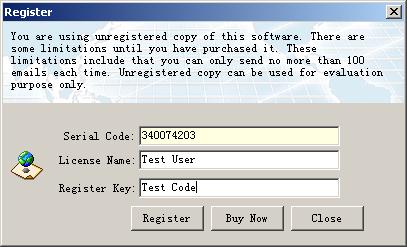
3) Please use copy and paste to enter the unlock code exactly as you have received. For example, you have received:
License Name:Test User
Register Key:Test Code
Then, you should copy Test User as License Name, copy Test Code as Register Key(unlock key). finally, click [Register] button. It will be registered with your code. Enjoy it. :)
Q: (DNS question) I got error message "Failed to query MX server of somedomain.com" when I was trying to send e-mail.
A: This means you need to enter a right DNS server address. Click here for details
You may also need to check if the e-mail address you want to send is right. The right format of an e-mail address looks like aaa@hotmail.com
Q:How to set my own language in e-mails to be sent out? (set charset)
To set charset, run our application, in [settings->charset], choose the charset you need.
If your language is not in the predefined list, you can enter your charset directly.
Don't know what's the charset code for your language? search charset for XXX (xxx is your language) in google.
|






 Privacy Policy


.jpg)

